
Table of Content
Onboarding and First Impressions
Navigation and Information Architecture
Dashboard Layout and Data Visualization
Workflow Efficiency and Product Interaction
Design Systems and Accessibility
Scale Product Retention Through Usability
Introduction
Unfortunately, many product teams fall into structural traps that complicate day-to-day operations, puzzle new users, and damage retention metrics. These common UI/UX mistakes in SaaS platforms are rarely about poor color choices or unappealing fonts; instead, they stem from deep structural errors in information architecture and workflow logic.
When an application interface forces users to guess their next step, it creates invisible barriers that stall user growth and reduces overall engagement. For deeper insights into this, explore UI/UX usability issues in SaaS platforms. Addressing these product design flaws systematically is the fastest way to elevate your primary performance indicators and keep users engaged over the long term. For scalable solutions to these issues, explore our UI/UX design agency for SaaS platforms.
Onboarding and First Impressions
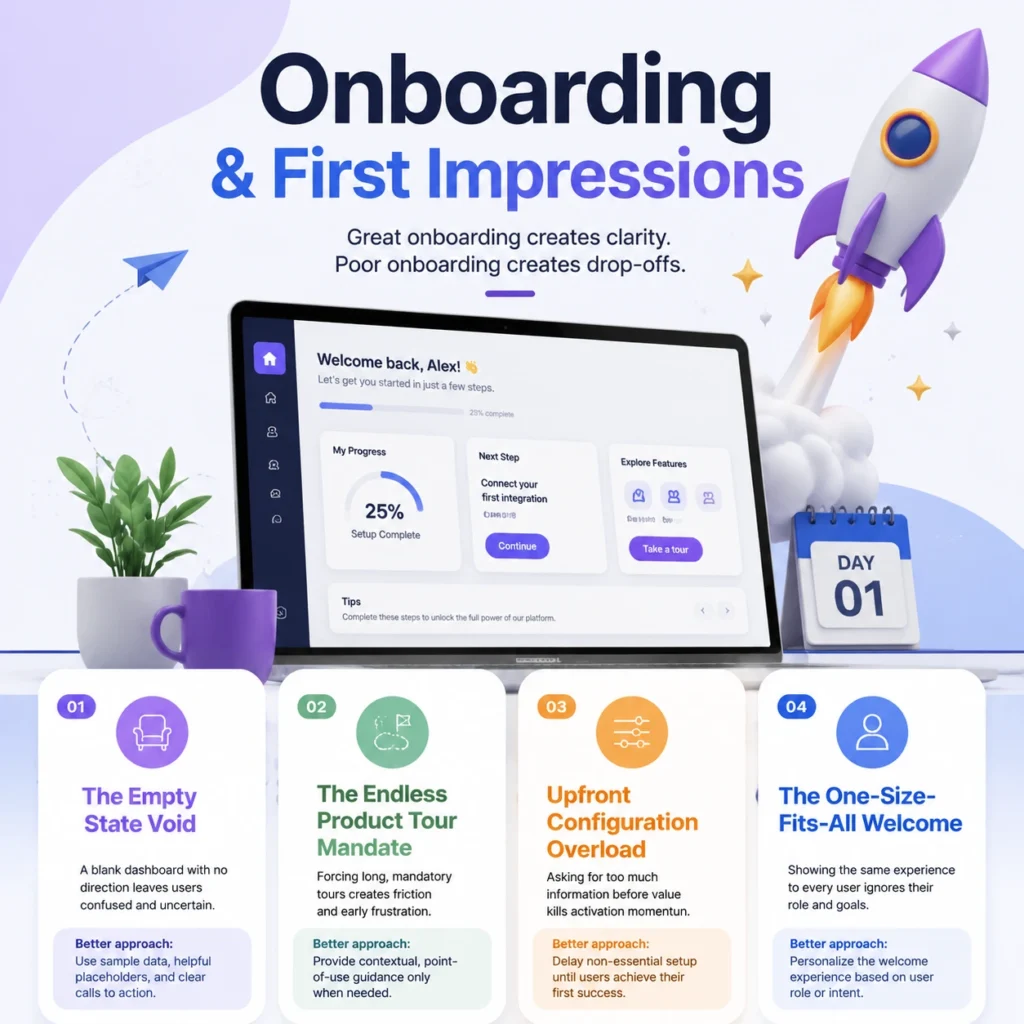
1. The Empty State Void
Dropping a newly registered subscriber into a completely blank dashboard with zero direction creates immediate confusion. Instead of displaying a cold, empty screen, populate the workspace with interactive sample data, instructional placeholders, or clear calls to action that prompt immediate engagement.
2. The Endless Product Tour Mandate
Forcing a subscriber through a mandatory, fifteen-step tooltip walkthrough introduces massive user onboarding friction right from the start. Replace long, intrusive tours with contextual, point-of-use hints that appear naturally only when a user interacts with a specific feature for the first time.
3. Upfront Configuration Overload
Demanding extensive account customization, profile uploads, or billing setups before a user can see the core value of your product kills activation momentum. Postpone non-essential onboarding questions until after the subscriber experiences their first successful outcome inside the workspace.
4. The One-Size-Fits-All Welcome
Treating an executive buyer looking for high-level reports exactly the same as a technical specialist who needs daily tools stalls product adoption. Implement a simple, one-question welcome gate to segment your users, adjusting the primary dashboard view to match each role’s specific needs.
Navigation and Information Architecture
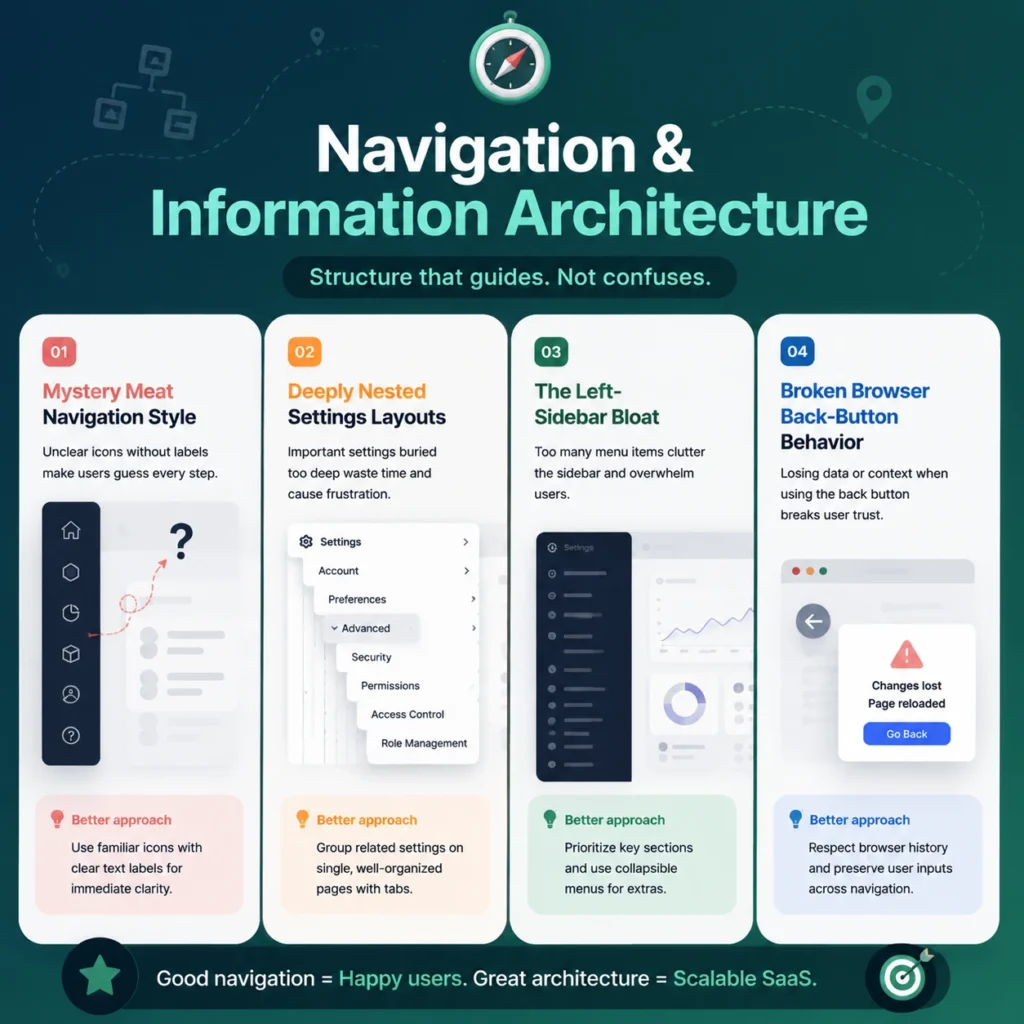
5. Mystery Meat Navigation Style
Using abstract, non-standard icons without descriptive text labels forces users to hover over every button just to find basic tools. Stick to universally recognized icons paired with clear text markers to establish a highly predictable, self-explanatory system.
6. Deeply Nested Settings Layouts
Burying essential configuration controls four levels deep inside sub-menus creates frustration and slows down administrative tasks. Keep your app configuration clean by grouping related variables onto single, tabbed pages that allow users to update their preferences with minimal clicks.
7. The Left-Sidebar Bloat
Allowing your main navigation sidebar to grow unchecked as you add new features yields cluttered, unreadable dashboards. Apply progressive disclosure principles, keeping primary categories visible while tucking secondary tools into collapsible sub-sections.
8. Broken Browser Back-Button Behavior
Forcing a full application reload or wiping out active form text when a user hits their browser’s back button completely disrupts their workflow. Build your Single Page Application (SPA) architecture to respect standard browser history patterns, safely saving user inputs as they move between tabs.
Dashboard Layout and Data Visualization
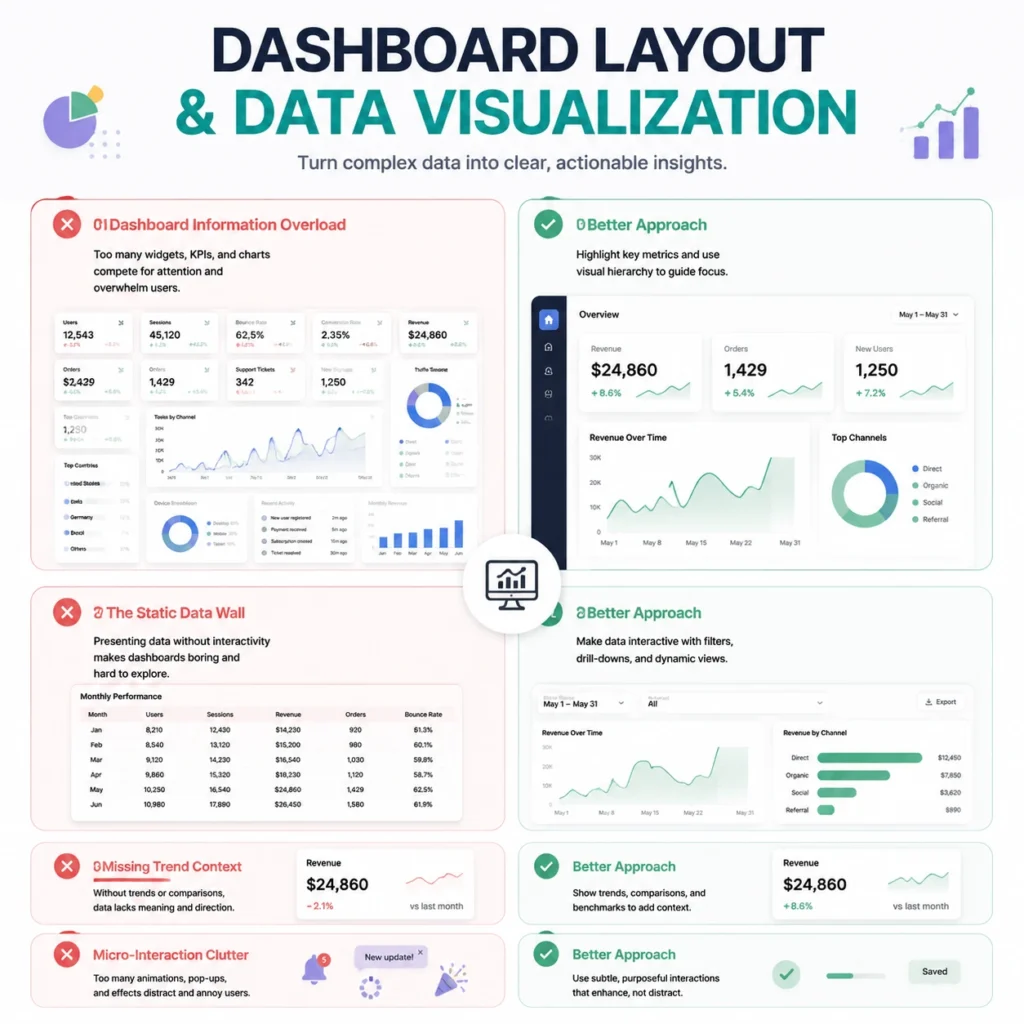
9. Dashboard Information Overload
Treating your primary landing screen as a dumping ground for every single data metric creates immense dashboard information overload. Focus the main dashboard view on the top three core metrics that matter most to your user, leaving deep, granular details for specialized reporting sub-modules.
10. The Static Data Wall
Displaying beautiful charts that lack interactive sorting, date filtering, or hover details severely limits their usefulness. Ensure your analytics blocks allow users to click, isolate, and export specific data segments without needing to run separate, manual reports.
11. Missing Trend Context
Presenting standalone numbers without historical baselines or percentage changes makes it very difficult for teams to judge performance. Always display a clear comparison metric—such as a month-over-month percentage change—directly alongside your primary performance scores.
12. Micro-Interaction Clutter
Adding heavy, slow-loading transitions and bounce animations to every button click bogs down the interface and delays access to information. Restrict your interactive styling to snappy, sub-100ms hover transitions that confirm user actions without slowing down software responsiveness.
Workflow Efficiency and Product Interaction
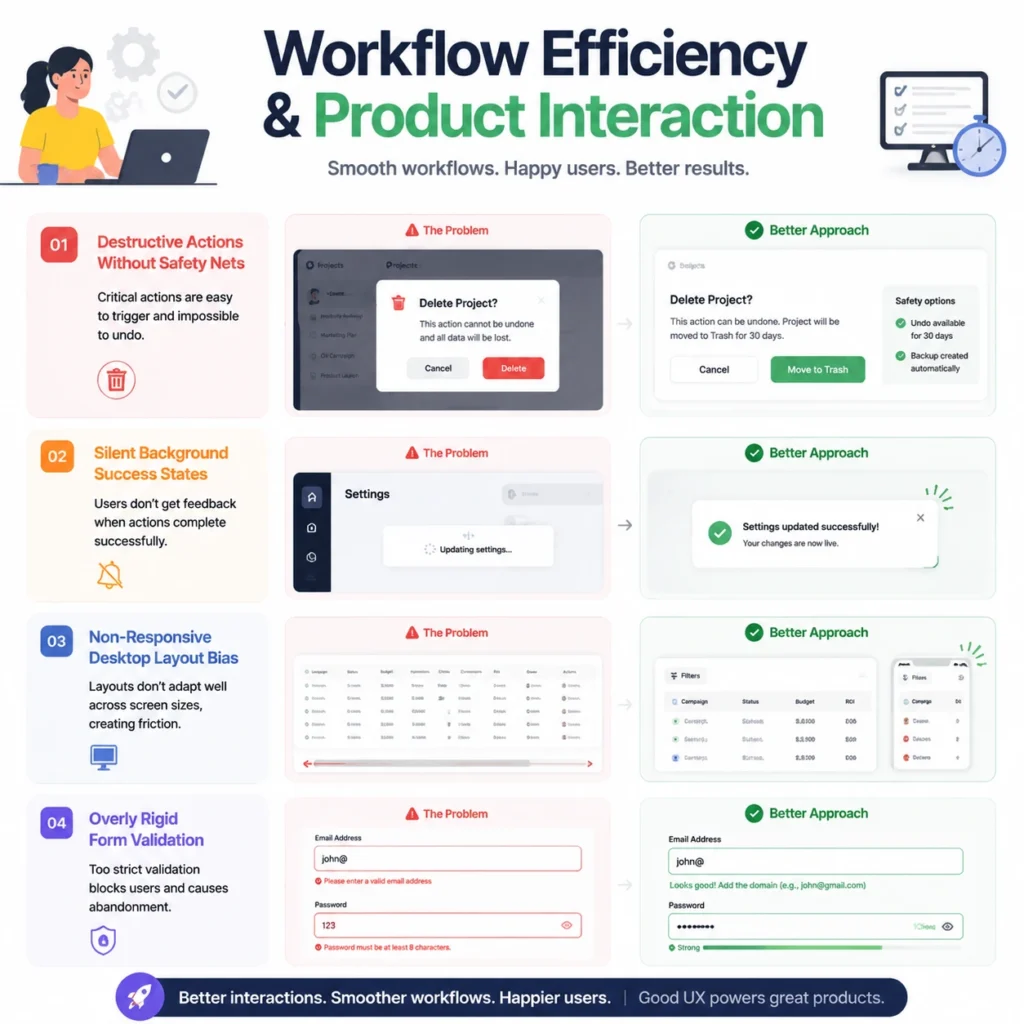
13. Destructive Actions Without Safety Nets
Allowing a team member to permanently delete account data or cancel active processes with a single click leads to costly accidental losses. Introduce intentional friction for critical actions, requiring users to type out confirmation words before executing permanent deletions.
14. Silent Background Success States
Processing complex, long-running database updates behind the scenes without showing a clear success notification leaves users guessing if their action worked. Use subtle, clear snackbar notifications or success badges to confirm task completion without disrupting the user’s active screen.
15. Non-Responsive Desktop Layout Bias
Building a platform with the assumption that users will only access it from giant desktop monitors creates broken, unreadable screens on smaller laptops. Design your interface components using flexible grids to maintain clean alignment and legibility across all form factors.
16. Overly Rigid Form Validation
Rejecting phone numbers or tax codes over basic spacing or formatting variations creates needless roadblocks during data entry. Program your input fields to accept flexible, natural formatting, using backend filters to sanitize the text data automatically before submission.
Design Systems and Accessibility
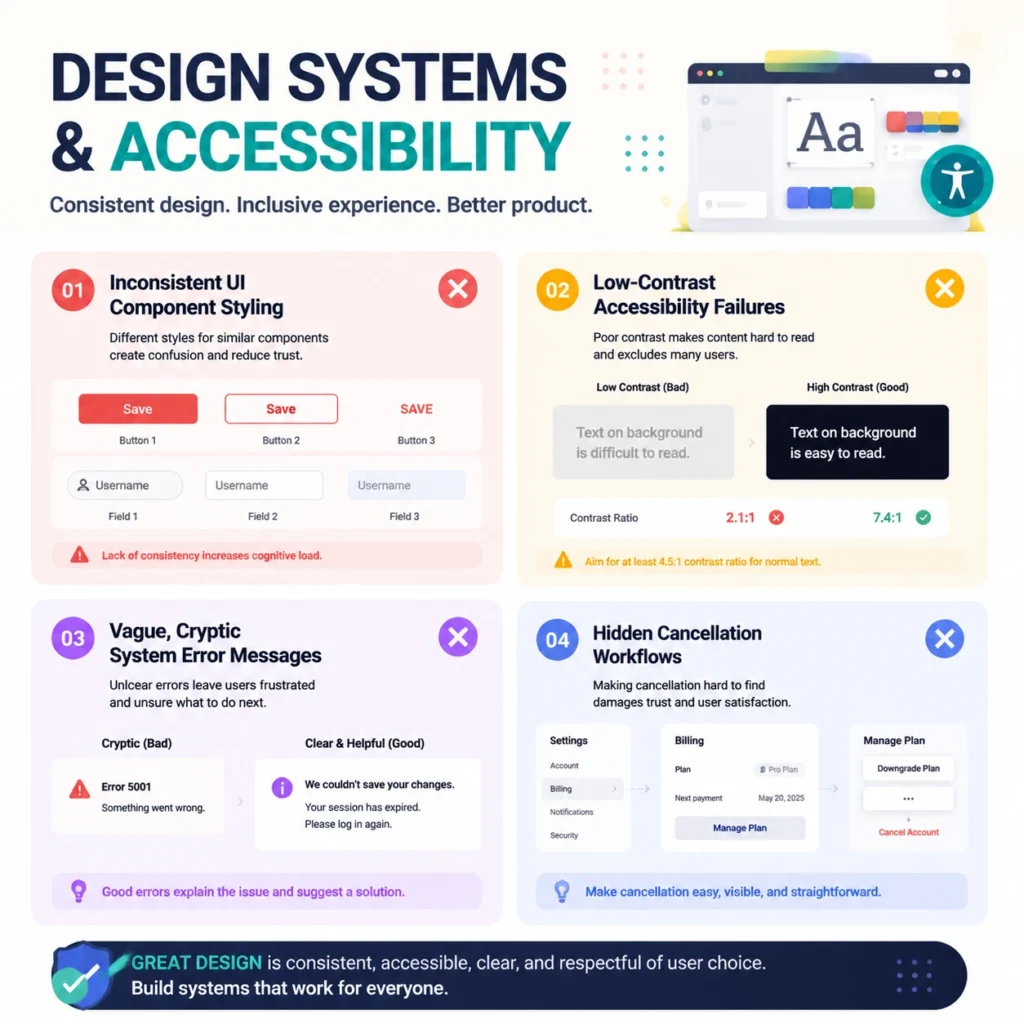
17. Inconsistent UI Component Styling
Mixing distinct button styles, input forms, and font weights across different product modules points to major UI consistency issues. Build a unified product library inside your workspace, using locked global design tokens to handle all button states, margins, and typographies uniformly.
18. Low-Contrast Accessibility Failures
Using faint gray text on off-white backgrounds violates international accessibility standards and makes your software tough to read under standard office lighting. Follow strict WCAG AA contrast rules, keeping your text contrast ratio above 4.5:1 to preserve legibility for all subscribers.
19. Vague, Cryptic System Error Messages
Displaying confusing backend error codes during an application snag leaves users feeling stranded with no clear path forward. Write helpful, plain-language error messages that explain exactly what went wrong and provide an immediate button to retry or fix the issue.
20. Hidden Cancellation Workflows
Burying account management or downgrading paths behind complex support hoops destroys trust and frustrates users. Make your billing settings transparent and easy to find, as providing a smooth exit path actually leaves the door open for future re-engagement.
Scale Product Retention Through Usability
Eliminating these frequent interface friction points requires a continuous commitment to evaluation and optimization. The average drop-off rate during an initial software onboarding sequence hits 40 to 60 percent, proving that early design choices directly dictate long-term user retention. Fix these retention issues with a SaaS UI/UX design service focused on usability and growth. Relying on regular SaaS usability testing helps teams spot early behavioral bottlenecks before they turn into permanent subscription cancellations. Shifting away from cluttered layout habits toward a lean, functional approach ensures your web application interface remains a high-value tool that users love to log into every single day.
Ever worked with FlowmazeUX?
FlowmazeUX removes navigation friction points to directly help you fix user churn rate spikes. We integrate directly alongside your software development squad, helping your company secure market dominance through sharp, low-friction digital execution.
Frequently Ask Questions
Track the percentage of users who drop off between initial account creation and their first key feature action, as this metric highlights the exact revenue lost to early interface roadblocks.
Run targeted session recordings to see exactly where users stall out, then immediately simplify those high-friction steps to give subscribers a faster path to value.
Conduct lean, focused testing loops with five to seven users monthly to catch layout issues early, rather than waiting for a major platform overhaul.
If a user takes longer than five seconds to spot their top three core performance scores, your dashboard layout likely needs a cleaner hierarchy.
When core features are hidden behind confusing names or nested deep within multiple menu layers, subscribers struggle to discover the full value of your platform.
Establish a single, central design repository inside Figma, and use shared design tokens to push identical styling rules out to all development environments.
Your platform must support full keyboard navigation, maintain high typographic contrast ratios, and provide clear descriptive text labels for screen readers.
Yes, a complete structural refresh allows you to redesign confusing workflows, streamline old dashboard setups, and guide users directly toward underutilized tools.