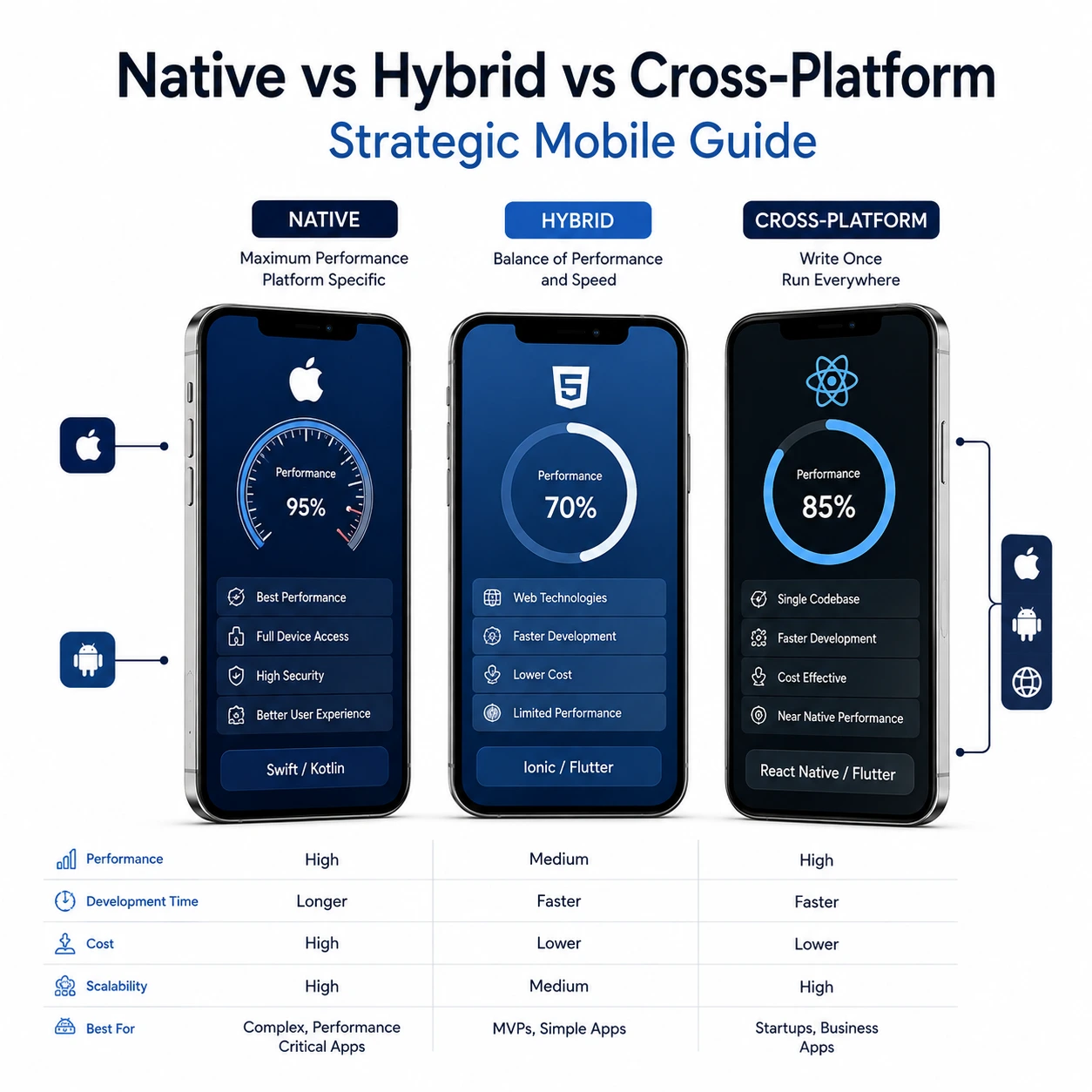
Native vs Hybrid vs Cross-Platform Overview
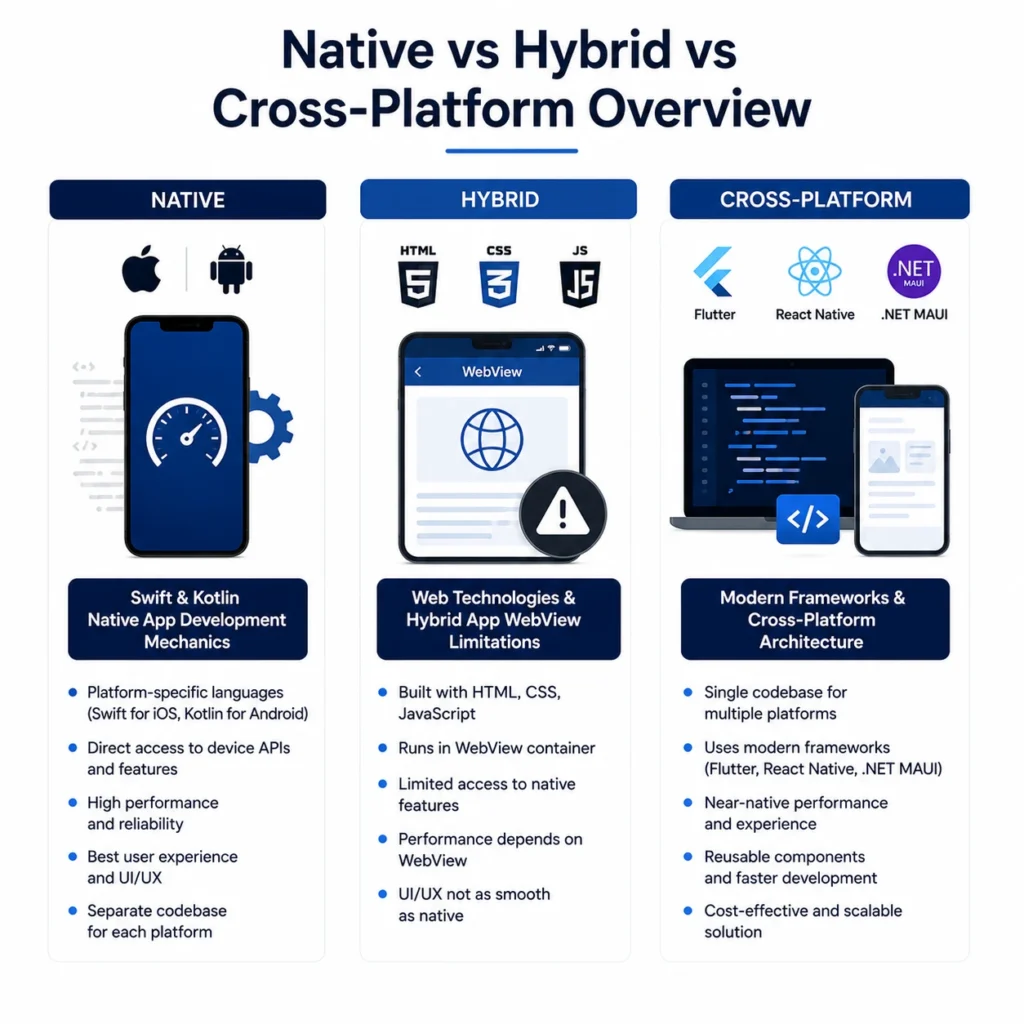 Each mobile development method builds apps using fundamentally different underlying mechanics. Selecting the right stack demands knowing what happens under the hood when a user taps your screen.
Swift Kotlin Native App Development Mechanics
Native software runs directly on a phone’s operating system using platform-specific programming languages. Developers write iOS apps in Swift and Android apps in Kotlin. This approach gives engineers direct access to device cameras, Bluetooth chips, and graphics processors without translation layers. You pay a price in headcount because you need two separate engineering teams, but you get uncompromised speed, instant hardware access, and silky smooth 120Hz animations.Web Technologies and Hybrid App WebView Limitations
Hybrid platforms wrap web pages inside an app container using a hidden internal browser. Frameworks like Ionic or Apache Cordova package HTML, CSS, and JavaScript into a basic shell that runs on any phone. While this setup lets web developers build mobile tools quickly, hybrid app webview limitations choke complex applications. High memory consumption, sluggish page scrolling, and delayed touch responses plague hybrid software as soon as data loads increase.Modern Frameworks and Cross-Platform Architecture
Cross-platform tools bridge the gap between web speed and native performance by compiling shared code into platform elements. Instead of running inside an internal browser, applications share a single logic core while rendering native UI controls or drawing custom pixels on screen. This architecture lets teams ship to both app stores simultaneously without sacrificing core user experience.Deep Technical Comparison Across Mobile Stacks
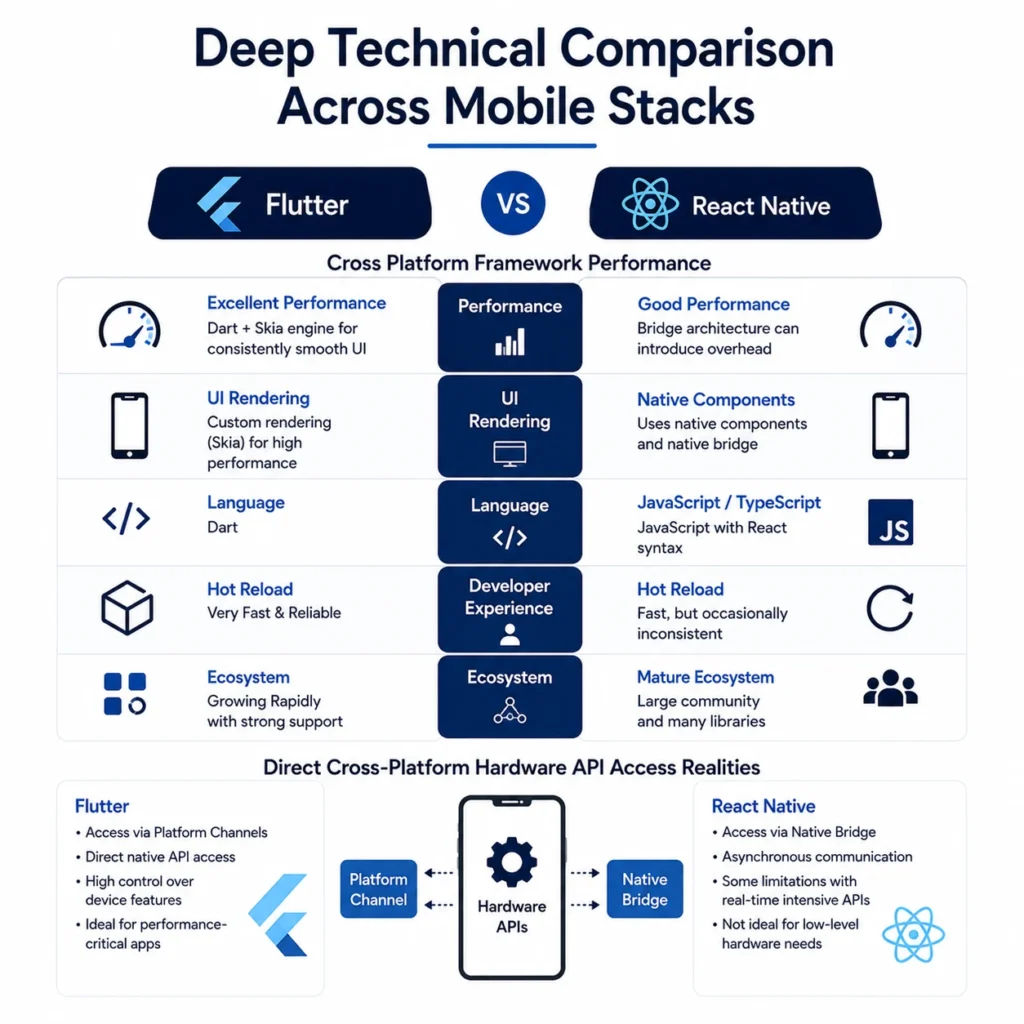 Technical trade-offs dictate how your app feels under heavy load. Comparing frameworks head-to-head exposes clear performance boundaries.
Flutter vs React Native Cross Platform Framework Performance
Battle-testing Flutter vs React Native cross platform tools comes down to visual rendering vs native UI integration. Google’s Flutter uses the Dart language and draws every pixel on an internal canvas engine. This design guarantees identical visuals across iOS and Android, even on older devices. Meta’s React Native uses JavaScript to control real native components through a modern bridge. React Native feels closer to standard phone applications, but heavy animations can trigger frame drops if JavaScript threads get overloaded.Direct Cross-Platform Hardware API Access Realities
Connecting to specialized device sensors presents distinct challenges for non-native frameworks. Native apps communicate with biometrics, NFC tags, and advanced camera modules instantly using stock system libraries. Modern cross-platform engines handle standard phone features cleanly through community plugins. Problems arise when phone makers update their operating systems; cross-platform teams must wait for plugin maintainers to patch code before accessing brand-new hardware features.Financial Analysis and Development Velocity
 Financial constraints dictate most software decisions. Strategic leaders weigh upfront engineering invoices against ongoing maintenance bills.
Budget Efficiency via Single Codebase Mobile Development Cost
Cutting engineering expenses starts with consolidating your development stack into a single team. Paying one cross-platform engineering team to write shared application logic slashes initial payroll compared to funding separate iOS and Android specialists. A lower single codebase mobile development cost helps early-stage platforms stretch seed capital further while maintaining functional feature parity across all user devices. Businesses can evaluate these technical and financial considerations as part of their custom mobile app development strategyRapid Market Launch through Time to Market Cross-Platform App
Speed wins market share when launching fresh digital products. Deploying a time-to-market cross-platform app cuts development cycles dramatically because engineers build features once and release them everywhere. Simultaneous platform launches prevent marketing fragmentation, allowing your team to gather user analytics and iterate product ideas rapidly across the entire market.Codebase Savings and Long-Term App Maintenance: Codebase Cost
Bug fixes cost twice as much when you manage two independent software repos. Maintaining separate Swift and Kotlin projects means diagnosing issues twice, updating business logic twice, and syncing feature releases constantly. Minimizing your long-term app maintenance codebase cost through shared architecture frees up engineering capacity, allowing your team to focus on new feature innovation rather than duplicate maintenance work.App Store Governance and Technical Trade-Offs
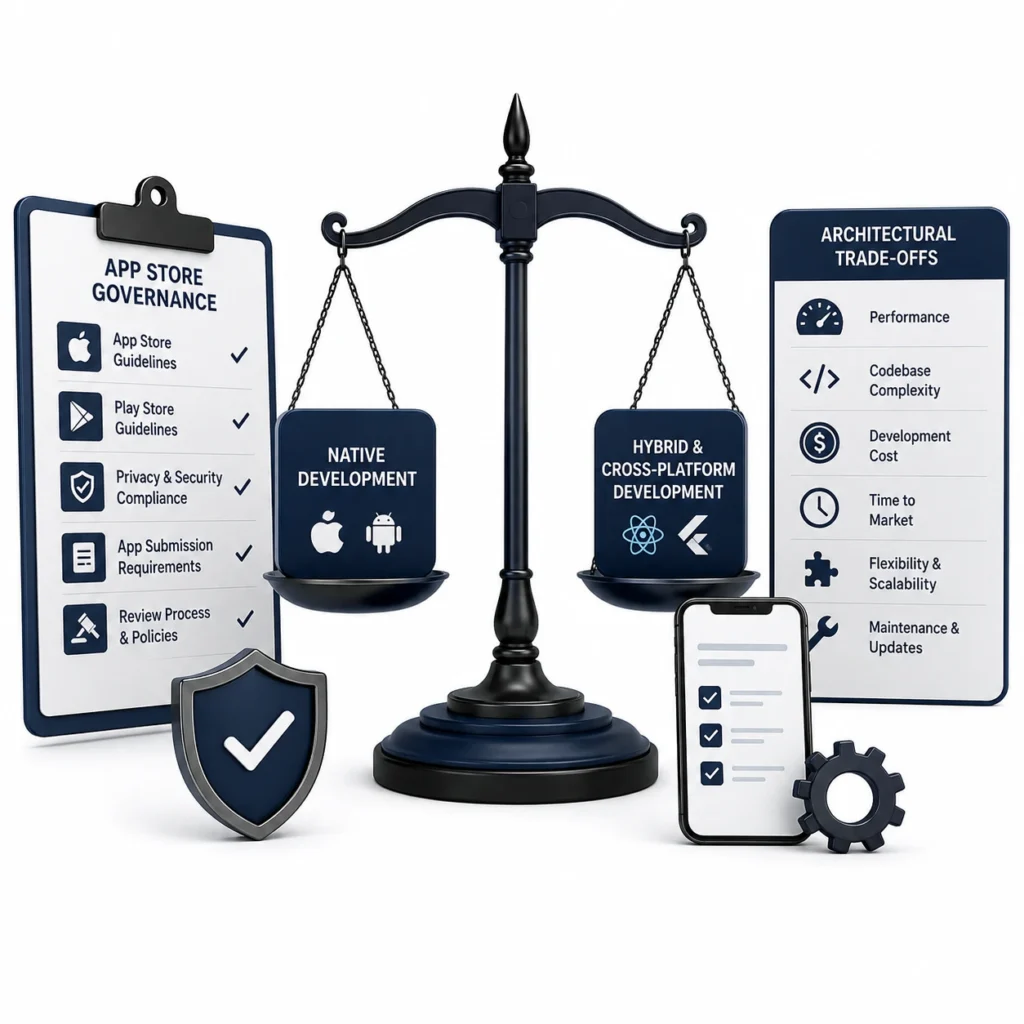 Getting code onto user devices requires passing strict review guidelines from tech giants. Architecture directly impacts your launch risk.
Guidelines and App Store Submission: Native vs Hybrid Challenges
Navigating app store review boards reveals massive stability gaps between software stacks. Apple and Google reject applications that feel like slow, glorified websites. High rejection rates surround app store submission native vs hybrid builds due to unexpected webview crashes, sluggish UI responsiveness, and non-standard navigation menus. Native and compiled cross-platform apps navigate compliance checks smoothly because they match standard OS design guidelines.Strategic Mobile App Platform Architectural Trade-Offs
Balancing technical choices needs objective evaluation of long-term business goals. Use this comparison matrix to pick the right path for your product:| Architectural Criteria | Native (Swift / Kotlin) | Hybrid (Ionic / Webview) | Cross-Platform (Flutter / React Native) |
| Performance & Speed | Maximum | Low to Moderate | Near-Native |
| Code Reuse Rate | 0% (Separate Builds) | 90% – 95% | 75% – 90% |
| Development Speed | Slow | Very Fast | Fast |
| Hardware API Access | Instant & Full | Restricted via Wrappers | Strong via Plugins |
| Initial Build Cost | High | Low | Moderate |
| Ongoing Maintenance | Expensive | Cheap | Efficient |
Frequently Ask Questions
Native apps run platform-specific code directly on the phone OS. Hybrid apps load web code inside a hidden internal browser shell. Cross-Platform apps write code once in a shared language and compile it into native UI controls or custom canvas renders.
Choose native development when your application relies heavily on high-performance 3D graphics, complex AR/VR processing, real-time Bluetooth hardware connections, or background processing tasks that asks maximum hardware access and zero rendering lag.
Hybrid apps depend on a mobile browser engine to process interface styles and JavaScript logic. This extra layer creates high memory consumption, frame rate drops during scrolling, and input delay when handling large data streams or complex screen animations.
Flutter draws every UI element manually using its Skia/Impeller engine, giving you identical visual layouts across all OS versions. React Native bridges JavaScript logic to real native system components, creating a feel closer to stock OS apps.
Building a single codebase application cuts initial development budgets by 30% to 45% compared to hiring separate iOS and Android teams. It also slashes ongoing operational costs by keeping feature updates in one shared repository.
App stores reject hybrid applications that perform poorly or look like simple web links. Slow screen loads, non-standard back-button behavior, and webview layout bugs trigger automatic review rejections under strict quality guidelines.
Cross-platform projects launch 30% to 50% faster than dual native builds. Writing one codebase allows teams to build, test, and release features simultaneously across iOS and Android without managing dual development schedules.
Yes. Modern cross-platform frameworks access phone cameras, GPS location tools, biometrics, and accelerometers using pre-built community plugins or custom native bridges without performance loss.