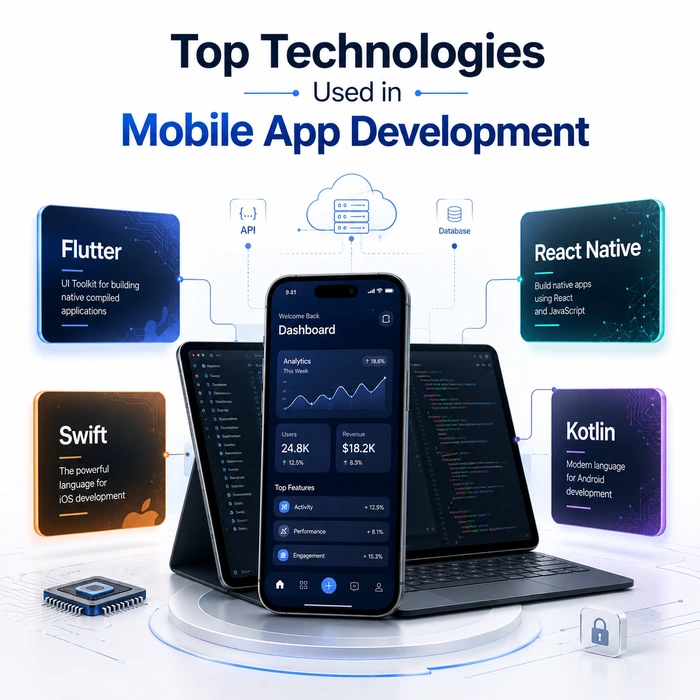
Choosing your technical stack is the single most critical decision you will make before writing a single line of code. The primary technologies used in mobile app development fall into three distinct categories: native languages like Swift and Kotlin, cross-platform frameworks like Flutter and React Native, and hybrid backend architectures like Firebase or AWS.
Technology selection is only one part of the overall development process. For a broader look at planning, design, development, testing, and launch, read our Custom Mobile App Development Services: Complete Guide
Picking the wrong framework creates permanent performance bottlenecks, doubles your maintenance bill, and forces expensive code rewrites down the road. This guide cuts through agency buzzwords to give you the raw performance metrics, framework comparisons, and architectural realities needed to select the perfect tech stack for your digital asset.
Core Tech Stack Choices and System Architecture
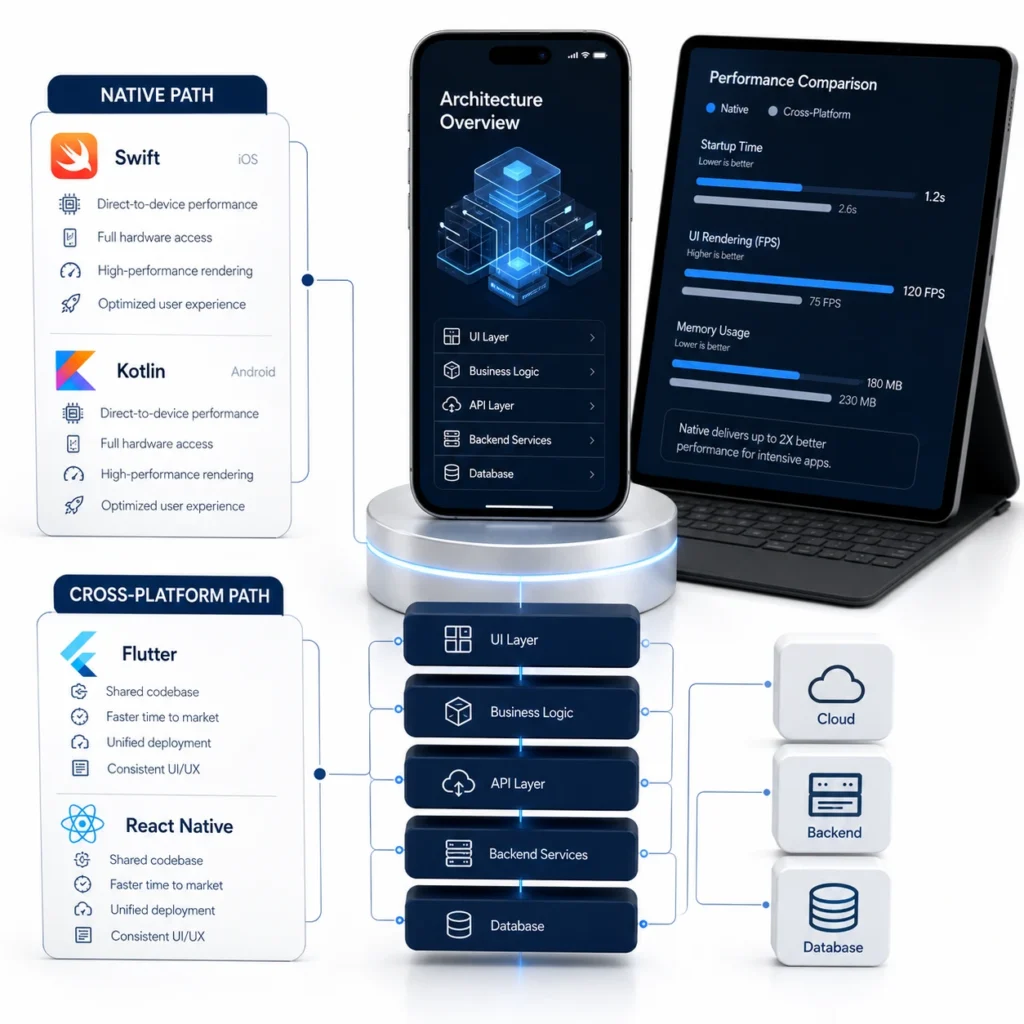
Your tech stack directly controls how fast your app runs, how easy it is to scale, and how much you spend on monthly server hosting. Settling for outdated frameworks just because your developers are comfortable with them is a fast track to tech debt.
Cross-Platform vs Native Performance Benchmarks
Native apps compiled directly into machine code offer sixty frames per second rendering and instant CPU response times, whereas cross-platform apps rely on bridge layers that can add slight latency. Swift on iOS and Kotlin on Android deliver the absolute maximum speed for high-load products like mobile games or real-time audio processors. However, modern cross-platform engines render directly to a graphics canvas, closing the performance gap so well that ninety-five percent of standard business applications perform identically to native builds.
Strategic Rules for Mobile App Tech Stack Selection
Selection of your mobile app tech stack depends strictly on your hardware needs, development budget, and immediate launch timeline. If your app requires heavy camera processing, complex Bluetooth connections, or custom background sensors, native code is mandatory. If your priority is launching a high-converting MVP across both major operating systems under tight deadlines, a shared framework is the smarter move.
The framework is only one part of the larger development strategy. Your budget, feature roadmap, UI requirements, backend infrastructure, and deployment plan should also be evaluated together when choosing a custom mobile app development approach.
Single Codebase Frameworks for Faster Market Entry
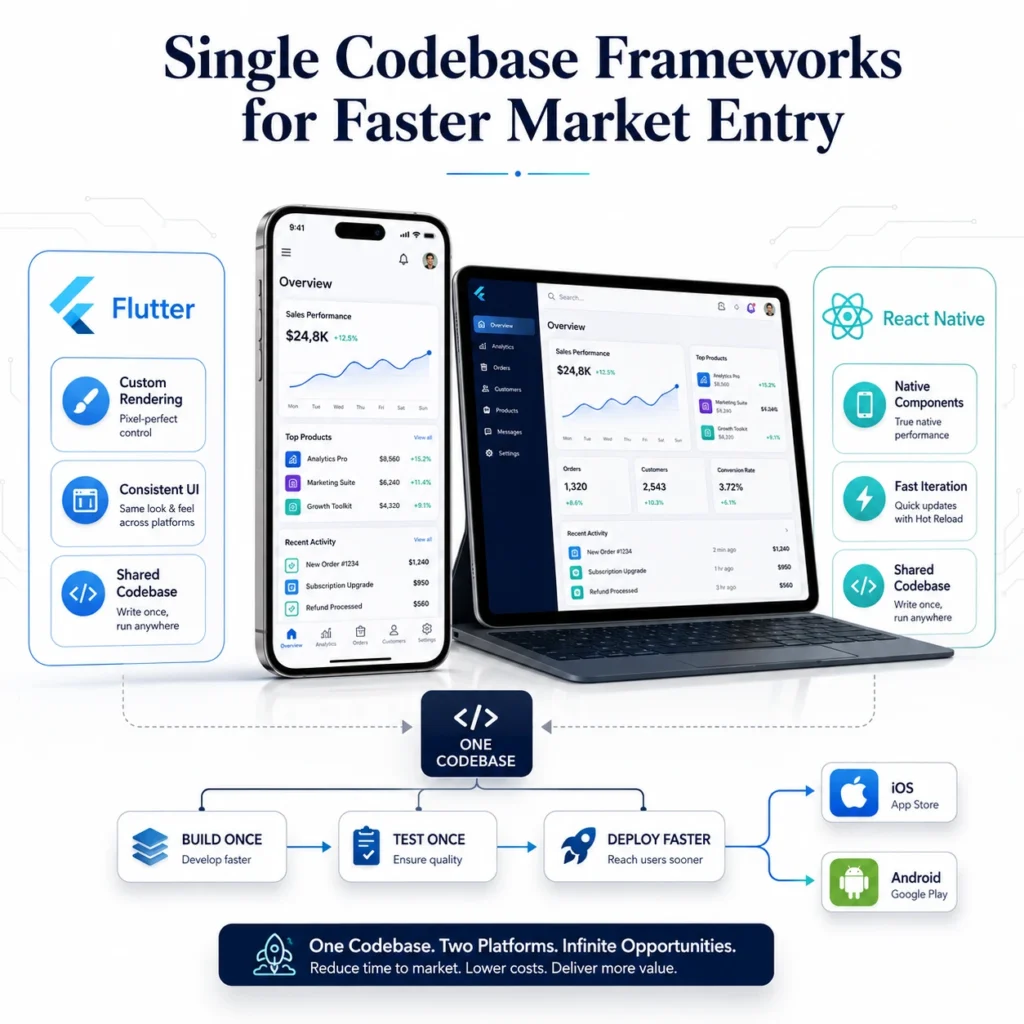
Building one codebase that runs on both iOS and Android cuts your upfront engineering costs by up to forty percent while keeping your feature updates in sync. Cross-platform tools have evolved from clunky web views into high-performance native competitors.
Flutter vs React Native Framework Capabilities
The Flutter vs React Native framework battle comes down to rendering engines versus native component bridges. Google Flutter uses the Skia and Impeller engines to draw every pixel manually on screen, guaranteeing identical UI appearance across every single device. Meta React Native bridges JavaScript code directly to native OS components, giving your app a fully native look and feel while leveraging the world’s largest web developer ecosystem.
Fast Time to Market Cross-Platform Workflows
Choosing a cross-platform setup accelerates your initial software launch by eliminating the need to maintain two separate codebases simultaneously. Developers write feature logic once and deploy instantly to both app stores, cutting continuous integration testing hours in half. This unified workflow prevents feature gaps where Android users receive updates weeks after iOS users.
Modern Native UI Frameworks and Modular Logic
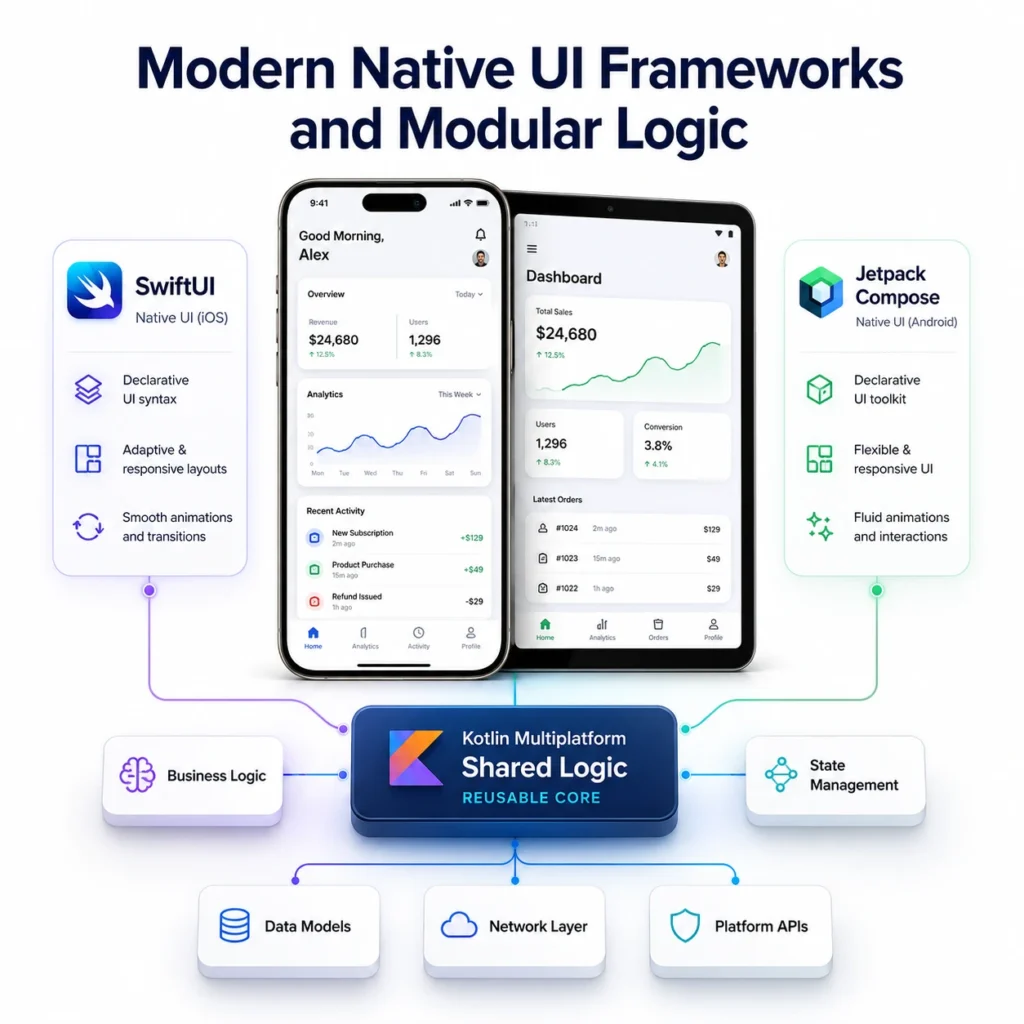
Native app development has completely shifted away from clunky XML layouts and storyboards toward modern declarative code. This architectural evolution allows engineers to build complex, responsive user interfaces with far less code.
Declarative UI Power with SwiftUI and Jetpack Compose
SwiftUI for Apple and Jetpack Compose for Google let developers define UI states directly in code. This helps reduce layout bugs and speeds up screen development. These modern toolkits also refresh interface elements automatically when the underlying data changes. As a result, developers can write less UI code and maintain it more easily. Using modern native UI code leads to smoother animations, cleaner codebases, and far fewer interface crashes.
Smart Code Reuse via Kotlin Multiplatform Shared Logic
Kotlin Multiplatform lets you write core business logic, data models, and network requests once in Kotlin. You can still keep the UI fully native for both iOS and Android. This approach combines native performance with the efficiency of shared code. It is a strong choice for teams that want a native UI without duplicating core logic.
Device Hardware Access and Lifecycle Maintenance
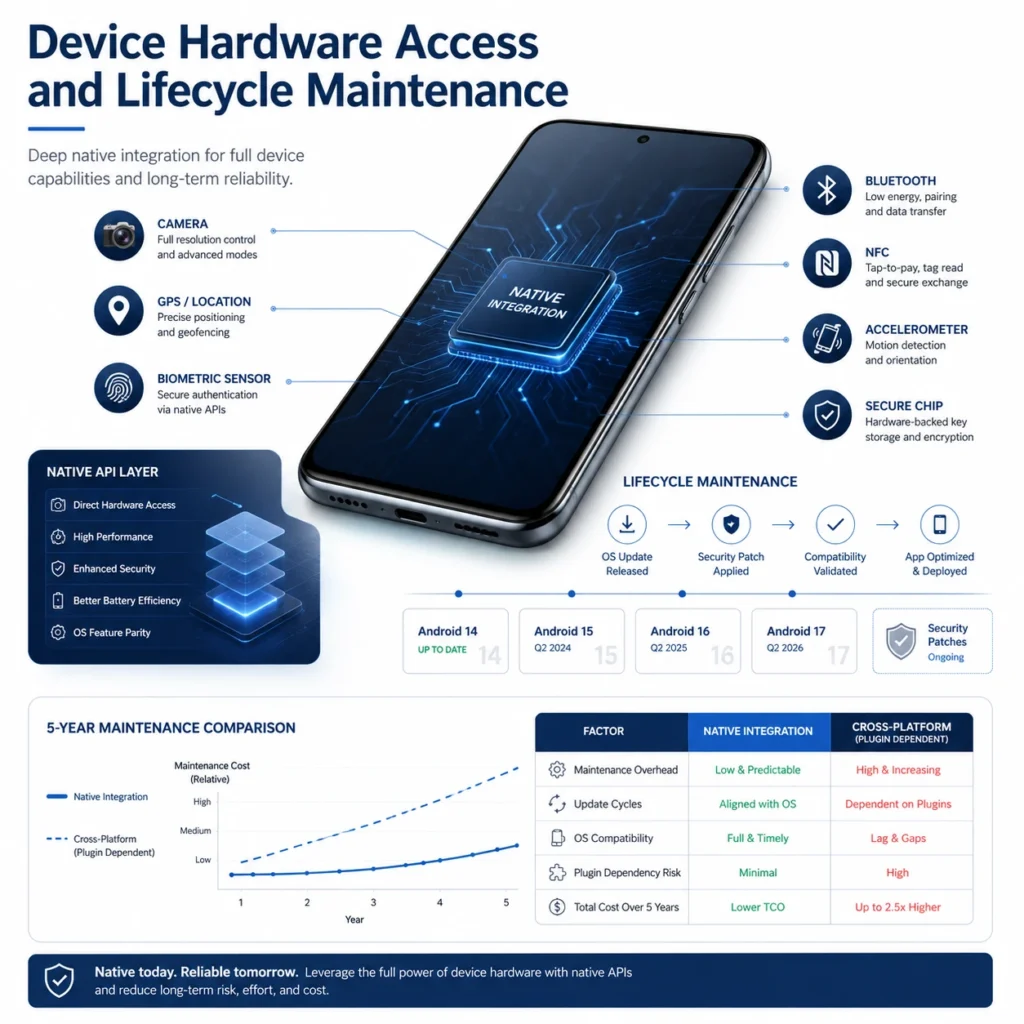
Connecting your app to physical phone hardware requires specialized API access that dictates long-term maintenance needs. Ignoring how your chosen framework talks to phone hardware creates massive headaches when new phone hardware hits the market.
Deep Device Access via Native API Hardware Integration
Direct access to device sensors through native API hardware integration confirms your app interacts seamlessly with GPS, biometrics, camera feeds, and Bluetooth chips without lag. Native code interacts directly with system drivers, guaranteeing instant response times for critical hardware triggers. Cross-platform apps must rely on third-party community plugins to access phone hardware, which frequently break when Apple or Google release new operating system updates.
Long-Term Math for App Maintenance Cost Comparison
Data from global mobile developer surveys reveals that nearly 45% of software engineers utilize cross-platform frameworks to ship business apps. Reduced maintenance overhead and shared code repositories allow engineering teams to reallocate up to 30% of their annual tech budgets directly into user acquisition and feature innovation.
In a multi-year app maintenance cost comparison, maintaining a single cross-platform codebase costs roughly thirty percent less annually than updating two distinct native apps. Every time Apple or Google changes their privacy rules or system APIs, native teams must write two separate code patches. A single codebase allows your team to push security patches, database updates, and UI tweaks across all platforms in a single sprint.
Scalable Architectures for Enterprise Applications
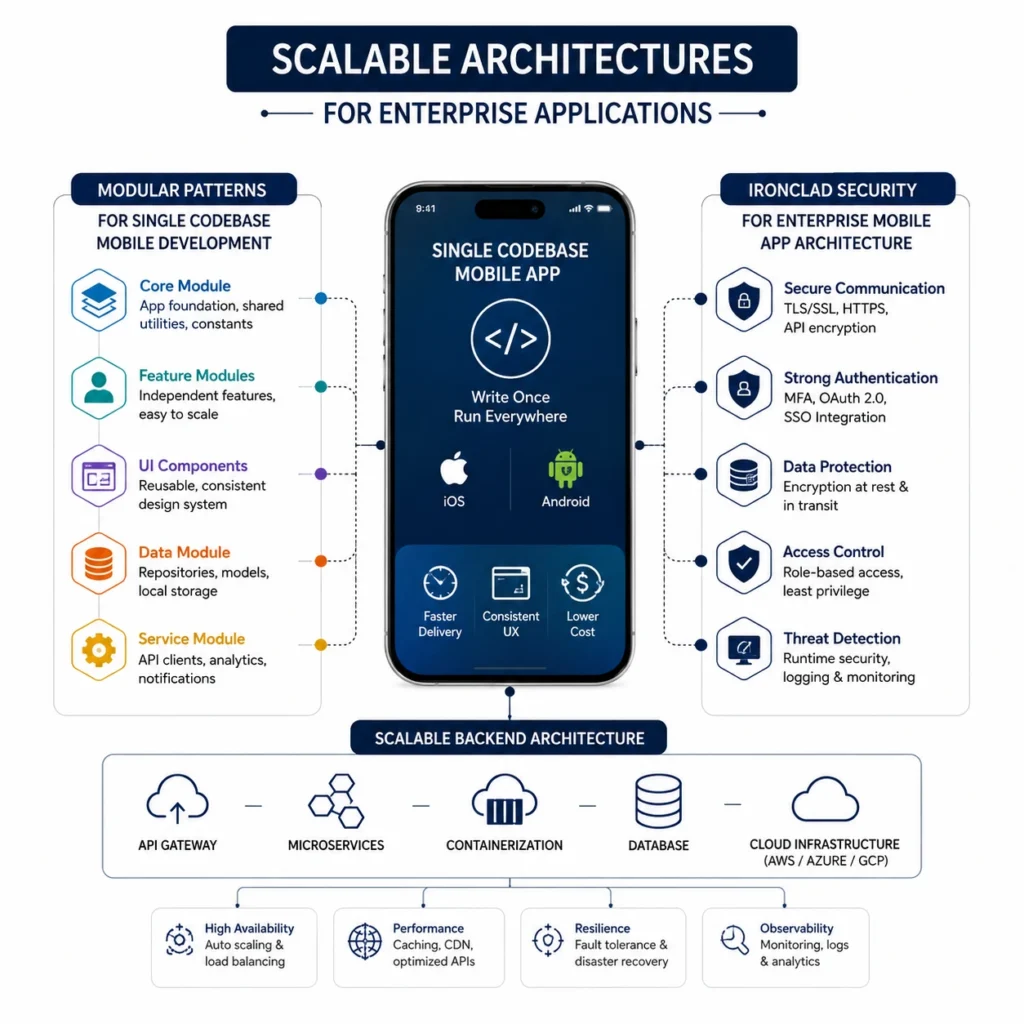
Enterprise software demands modular architecture patterns that allow dozens of developers to push code simultaneously without breaking core databases. Building an enterprise product on a weak foundation creates massive security risks and frequent server downtime.
Modular Patterns for Single Codebase Mobile Development
A modular single codebase mobile development setup isolates features into independent code blocks, preventing a bug in one section from crashing the entire app. Enterprise architectures split user authentication, payment processing, and profile management into separate modules. This modular design allows specialized engineering teams to update specific app features independently without triggering system-wide testing cycles.
Ironclad Security for Enterprise Mobile App Architecture
A secure enterprise mobile app architecture requires end-to-end data encryption, certificate pinning, and secure key storage inside hardware-backed device enclaves. Enterprise applications often process sensitive financial records or personal user data, making them prime targets for cyberattacks. Securing your backend APIs, preventing reverse engineering, and implementing strict role-based access controls protects your brand from catastrophic data breaches.
The Wrong Stack Costs More Than You Think.
Choosing the wrong tech stack isn’t just an engineering error; it is a financial trap that burns your capital and delays your launch. At FlowmazeUX, we eliminate the guesswork. Our custom mobile app development services cover product strategy, UI/UX design, technology selection, development, testing, and scalable architecture tailored to your business requirements.
We evaluate your product requirements, select the right architecture using Flutter, Swift, Kotlin, or other suitable technologies, and create clean, maintainable software designed for long-term growth. No unnecessary frameworks, no messy dependencies, just a technology stack built around performance, scalability, and your product goals.
Frequently Ask Questions
Flutter and React Native are the best choices for launching an MVP quickly because they allow you to deploy a single codebase across both iOS and Android. This single codebase setup slashes initial coding timelines by up to forty percent while keeping your operational budget low.
Modern cross-platform frameworks like Flutter render directly to the screen at sixty frames per second, making performance differences invisible to ninety-five percent of standard app users. Native code is only mandatory when your product relies on heavy 3D graphics, continuous background hardware tracking, or complex video processing.
Flutter compiles directly to native ARM machine code and draws its own UI pixels using the Impeller rendering engine. React Native bridges JavaScript code to actual native OS UI components, giving your application an authentic platform feel while using web-standard coding practices.
Kotlin Multiplatform allows you to write core business logic, database queries, and networking code once while keeping your UI native on both iOS and Android. This hybrid approach gives you native performance and UI accuracy without requiring you to write the same backend code twice.
SwiftUI and Jetpack Compose use declarative UI frameworks where code directly describes the interface state, automatically updating screen elements when data changes. This modern approach reduces total UI code by up to fifty percent and eliminates layout bugs common in older XML or Storyboard files.
Native code communicates directly with operating system APIs, ensuring your app stays stable when Apple or Google release annual updates. Cross-platform apps rely on third-party community plugins for hardware access, which can break and require manual fixes during major OS updates.
Cross-platform apps cost roughly thirty percent less to maintain over time because security updates, feature additions, and bug fixes are applied to one codebase. Native builds require you to pay separate engineering workflows to push identical updates across two distinct codebases.
Modular architecture splits your codebase into independent, isolated feature modules so multiple developers can work simultaneously without code conflicts. This structure ensures a bug in a secondary feature like user settings will never crash critical paths like checkout or account creation.